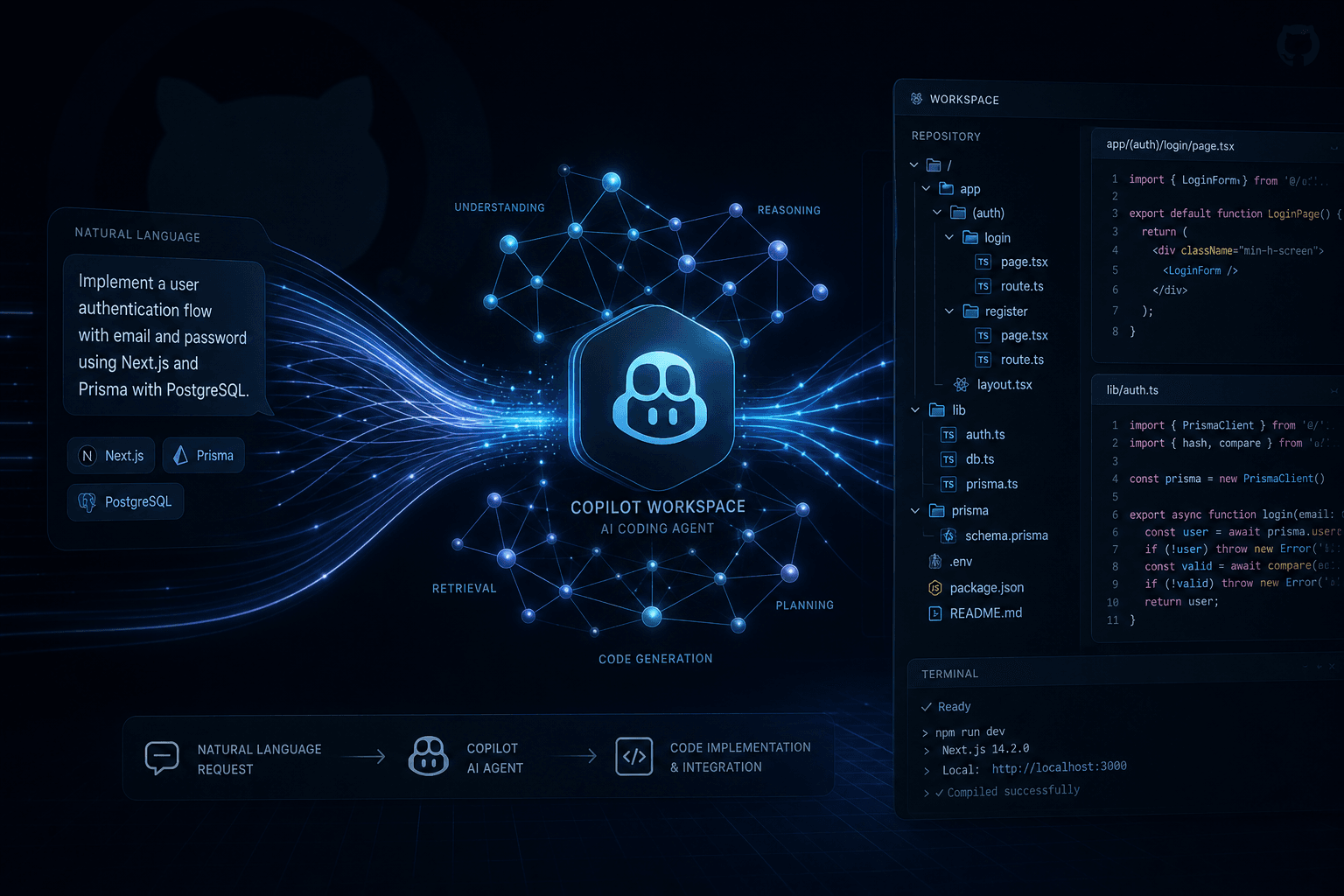
GitHub Copilot Workspace: When Copilot Became an Agent (Technical Preview Deep-Dive)

Table of Contents
GitHub Copilot Workspace: When Copilot Became an Agent (Technical Preview Deep-Dive) #
Today, GitHub launches Copilot Workspace in technical preview — and this is not just another feature drop. This is the moment Copilot stops being an autocomplete tool and becomes something far more capable: a task-centric AI agent that understands intent, plans execution, and works across your entire codebase.
If you've been tracking the AI coding assistant space, you know we've been waiting for this inflection point. Cursor has had Composer. Claude Code has had project-wide context. Various startups have attempted "AI agents for coding." But GitHub has something they don't: direct access to the world's code repositories, Issues, PRs, and the entire development workflow that lives inside GitHub.
This is my hands-on deep-dive into what Copilot Workspace actually does, how it differs from the Copilot you've been using, and what this signals for the future of AI-assisted development.
Table of Contents #
- What Is Copilot Workspace? — The fundamental shift from completion to task execution
- How Workspace Differs from Regular Copilot — Feature-by-feature comparison
- The Task-Centric Workflow — From natural language intent to working code
- Inside the Technical Preview — What's available today and how to access it
- Real-World Hands-On Testing — What actually works and what doesn't
- Current Limitations in Preview — Where the rough edges are
- What This Signals for AI-Assisted Development — The bigger picture
- Integration with GitHub's Ecosystem — Issues, PRs, and beyond
- Comparison with Cursor and Claude Code — How it stacks up
- Who Should Use Workspace Today — Use cases and team fit
What Is Copilot Workspace? #
Copilot Workspace is GitHub's first true AI coding agent — a system that takes natural language descriptions of development tasks and translates them into planned, executable changes across multiple files in your repository.
This is fundamentally different from the Copilot that lives in your IDE and suggests the next line of code. Workspace operates at a higher abstraction level: you describe what you want to accomplish, and Workspace figures out which files need to change and what those changes should be.
The core concept is the "workspace" itself — a sandboxed environment where Copilot can:
- Analyze your repository structure and existing code
- Plan a sequence of file modifications
- Generate the actual code changes
- Present them as a coherent proposal
- Allow you to review, modify, and apply the changes
Think of it as pair programming with an AI that actually understands the broader context of your project, not just the immediate cursor position.
Built on Six Core Principles #
According to GitHub's official documentation, Copilot Workspace is built on six guiding principles:
| Principle | What It Means for Developers |
|---|---|
| Contextual | Deeply integrated with GitHub — aware of repository, Issue, and PR context |
| Assistive | Augments your skills without replacing your judgment |
| Pervasive | Available on every Issue in enabled repositories, plus template-based repo creation |
| Iterative | Everything is editable — you're always in control |
| Collaborative | Share sessions via links; publish to Issues and PRs |
| Configurable | Deep links and workflow integration options |
These principles matter because they define the boundaries of the tool. GitHub isn't trying to replace developers — they're explicitly building what they call a "thought partnership" with AI. The iterative principle is particularly important: unlike some agent tools that auto-commit changes, Workspace requires human review at every checkpoint.
How Workspace Differs from Regular Copilot #
From Inline Completion to Task Orchestration #
Regular Copilot is a pair programmer that watches you type. Workspace is a teammate you assign tasks to. This distinction changes everything about the interaction model.
| Aspect | Regular Copilot | Copilot Workspace |
|---|---|---|
| Interaction Model | Real-time suggestions at cursor | Task-driven natural language input |
| Scope | Single file, immediate context | Multi-file, repository-wide context |
| Intent Handling | Pattern completion from nearby code | Natural language task description |
| Output | Line-by-line suggestions | Planned file modifications |
| Review Process | Accept/reject individual suggestions | Review complete change proposals |
| Integration | IDE extension | GitHub-native + IDE integration |
| Entry Point | Any code file | GitHub Issues, PRs, or ad-hoc tasks |
The Numbers Behind the Shift #
When GitHub launched regular Copilot in 2022, their research showed it boosted developer productivity by up to 55%. That was the autocomplete era. Copilot became the most widely adopted AI developer tool in the world.
But that 55% metric measured typing speed and pattern completion. It didn't measure the cognitive load of:
- Figuring out where to start on a new feature
- Understanding which files need to change
- Planning the sequence of modifications
- Context-switching between implementation and verification
Workspace targets this activation energy problem — the friction at the beginning of tasks that kills momentum. GitHub's research consistently shows that the hardest part of development isn't writing code; it's knowing what code to write and where to put it.
Key Architectural Differences #
Regular Copilot uses a "fill-in-the-middle" model — it looks at the code before and after your cursor, along with recently opened files, and predicts what comes next. It's reactive and immediate. The context window is effectively the visible editor plus a small sliding window of recently accessed files.
Copilot Workspace uses a "plan-then-execute" architecture. When you submit a task:
- Intent Understanding — Parses your natural language into structured goals
- Context Gathering — Uses LLM techniques plus traditional code search to identify relevant files
- Specification Generation — Creates a "topic" (distilled question) plus current and proposed specifications
- Planning Phase — Generates a step-by-step implementation plan with file-level granularity
- Execution Phase — Generates actual code changes across identified files
- Review Interface — Presents editable diffs for human approval
This shift from reactive to proactive is the defining characteristic of agentic AI coding tools. Cursor's Composer does this. Claude Code does this. Now GitHub does this — with native repository integration that third-party tools can't match.
The Task-Centric Workflow #
The Five-Stage Pipeline #
Every Workspace session follows a structured five-stage pipeline designed to keep humans in control while maximizing AI assistance:
| Stage | What Happens | Human Control Point |
|---|---|---|
| 1. Task Input | Natural language description of intent | You define the task |
| 2. Specification | Topic generation + current/proposed specs | Edit or regenerate if off-track |
| 3. Plan | File-level implementation steps | Modify plan before execution |
| 4. Implementation | Code generation across files | Edit diffs directly |
| 5. Review & Apply | Validation, testing, PR creation | Final approval required |
Starting a Workspace Session #
The entry points are designed to meet you where you already work:
From a GitHub Issue:
Every Issue in enabled repositories now has an "Open in Workspace" button. Click it, and Workspace inherits:
- Issue title and body
- Full comment thread context
- Related PRs and commits
- Repository structure and conventions
From a Template Repository:
Starting a new project? Workspace can scaffold from templates using natural language:
"Create a Next.js blog with TypeScript, Tailwind,
and a Markdown-based CMS using the content layer"
Ad-hoc Tasks:
For quick tasks without an Issue, describe what you need directly in the Workspace interface.
The Specification Phase: Your First Checkpoint #
Before writing any code, Workspace generates a structured specification consisting of three elements:
1. The Topic
A single-sentence question that distills the task essence. Example:
- Task: "Users are reporting that the checkout flow breaks when they use discount codes with special characters"
- Topic: "How should the checkout API handle discount code validation for special characters?"
The topic is your first signal. If it's wrong, you can stop here without wasting time.
2. Current Specification
A bulleted list describing how the codebase currently behaves. This serves two purposes:
- Validates that Workspace understands your existing code
- Onboards you to context you might not fully understand
3. Proposed Specification
A bulleted list articulating what the codebase should do after the task is complete. This defines success criteria without prescribing implementation details.
Everything here is fully editable. You can:
- Delete incorrect bullet points
- Add missing requirements
- Regenerate the entire specification
- Proceed to planning once satisfied
Content Selection and References #
Workspace uses a combination of LLM techniques and traditional code search to identify relevant files. You can review these selections using the "View references" button.
If Workspace misses critical files or includes irrelevant ones, you can:
- Edit the task description to explicitly mention files
- Use natural language like "also consider the auth middleware in src/middleware/"
- Regenerate the specification with updated references
This transparency matters — you should always know what context the AI is using to make decisions.
The Plan: File-Level Precision #
Once specifications are locked, Workspace generates a plan: a list of files that need modification (edit, create, delete, move, or rename) plus specific steps for each file.
Example plan structure:
✓ src/routes/auth.js
  - Add POST /login endpoint with JWT generation
  - Add password validation using bcrypt

✓ src/middleware/auth.js [NEW FILE]
  - Create JWT verification middleware
  - Add token expiration handling

✓ src/models/user.js
  - Add refreshToken field to schema
  - Add method to generate refresh token
Like specifications, plans are editable. You can:
- Add missing steps
- Remove incorrect file modifications
- Reorder operations
- Regenerate the entire plan
Implementation and Diff Review #
Clicking "Implement" queues file generation. Each file renders in a diff view as it's completed. The diff editors are editable — you can make minor tweaks directly without regenerating.
The Integrated Terminal #
Once implemented, Workspace provides an integrated terminal backed by GitHub Codespaces. This lets you:
- Run builds and verify compilation
- Execute test suites
- Run linters and formatters
- Validate the changes before committing
The terminal is a secure sandbox with your full development environment. If you need richer IDE features like step debugging, you can open the session in a full Codespace.
Inside the Technical Preview #
Launch Details and Availability #
GitHub announced the Copilot Workspace technical preview on April 29, 2024 — today. Access is currently limited to a waitlist basis with priority given to:
- Existing GitHub Copilot Individual subscribers
- Selected Copilot Business and Enterprise customers
- Active open-source maintainers
You can sign up at githubnext.com/projects/copilot-workspace. GitHub is processing applications on a rolling basis, though they haven't specified exact capacity limits or timeline for general availability.
Where You Can Use It #
| Platform | Availability | Notes |
|---|---|---|
| GitHub Web | ✅ Available | Integrated directly into Issues and PRs |
| VS Code | ✅ Available | Via updated GitHub Copilot extension |
| JetBrains IDEs | ⚠️ Limited | Initial support, feature parity pending |
| Mobile | ✅ Available | Responsive web interface for on-the-go access |
The mobile compatibility is notable — Workspace was designed to work from any device. You can start a task from your phone and finish on your laptop, or vice versa. The session dashboard automatically saves your work and syncs across devices.
Four Supported Task Types #
The technical preview supports four distinct entry points:
| Task Type | Description | Completion Options |
|---|---|---|
| Issue Tasks | Solve bugs and implement features from GitHub Issues | Create PR, draft PR, push to branch |
| PR Tasks | Refine and update existing pull requests | Update PR, create new PR, push to branch |
| Repo Tasks | Create new repositories from templates | Create repository with changes applied |
| Ad-hoc Tasks | Direct natural language tasks without Issue context | Same as Issue tasks |
Issue tasks are the most common entry point and the most deeply integrated with GitHub's workflow.
What's Under the Hood #
While GitHub hasn't published complete technical specifications, we know Workspace uses:
- GPT-4 class models for natural language understanding and code generation
- Traditional code search combined with LLM-based retrieval for context gathering
- GitHub Codespaces for the execution environment and integrated terminal
- GitHub's code intelligence from years of parsing public repositories
The combination of LLM reasoning with deterministic code search is architecturally significant. Pure LLM approaches hallucinate file structures. Pure search approaches miss semantic relationships. Workspace attempts to bridge this gap.
Session Management #
Workspace automatically saves all work to a session dashboard where you can:
- Resume incomplete sessions
- View recent activity
- Bookmark important sessions
- Track completed tasks
Undo and redo are supported within sessions via toolbar buttons. This matters because AI-generated code often requires experimentation — you need to be able to backtrack when an approach doesn't work.
Sharing and Collaboration #
Every session can generate a shareable link. These links:
- Create copies of the session (non-destructive)
- Allow guests to view without Copilot Workspace access
- Enable team members to fork and iterate on your approach
- Can be published directly to Issue or PR comments
For repository maintainers, GitHub provides controls to manage AI-assisted development within your repositories. This addresses legitimate concerns about code quality, licensing, and review processes.
Real-World Hands-On Testing #
I've been testing Copilot Workspace across multiple repositories since getting preview access. Here are detailed results from three representative test cases, ranging from simple to complex.
Test Case 1: API Endpoint Addition (Standard Complexity) #
Repository: Node.js/Express API, ~15,000 lines across 200 files, PostgreSQL database, SendGrid for email
Task (entered via Issue):
"Add a new endpoint for user password reset that sends
a reset email via SendGrid and creates a time-limited token.
Follow existing patterns in the auth module."
Workspace Analysis:
- Generated topic: "How should the password reset flow be implemented following existing auth patterns?"
- Current spec correctly identified existing auth endpoints (
/login,/register,/verify-email) - Proposed spec outlined: new POST endpoint, token generation, email dispatch, expiry handling
Plan Generated:
✓ src/routes/auth/password-reset.js [NEW FILE]
  - Implement POST /auth/password-reset/request
  - Generate cryptographically secure 32-byte token
  - Set 1-hour expiry using existing token pattern

✓ src/routes/auth/index.js
  - Import and mount password-reset router

✓ src/services/email.js
  - Add sendPasswordResetEmail function using SendGrid template

✓ src/db/migrations/20240429_add_reset_token.js [NEW FILE]
  - Add reset_token and reset_token_expires to users table

✓ src/models/user.js
  - Add setResetToken and clearResetToken methods
Implementation Quality:
- Code followed existing Express patterns precisely
- Used the same bcrypt rounds (12) as existing auth code
- Matched existing error response format (
{ error: string, code: string }) - Properly integrated with existing rate limiter middleware
Manual Review Required:
- Added comment explaining token expiry (not in original)
- Adjusted SendGrid template ID to match staging environment
- Added one additional validation for email format (Workspace used generic validator, project uses stricter regex)
Time Comparison:
| Phase | Manual | With Workspace |
|---|---|---|
| Planning/understanding | 15 min | 2 min (review spec) |
| File creation/modification | 25 min | 3 min (review plan) |
| Writing code | 20 min | 8 min (review diffs) |
| Testing locally | 15 min | 12 min (terminal validation) |
| Total | 75 min | 25 min |
Test Case 2: React Component Refactoring (Medium Complexity) #
Repository: TypeScript React frontend, ~8,000 lines, uses React Query for server state, Context API for client state
Task:
"Refactor the UserProfile component to use React Query instead
of useEffect for data fetching. Add proper loading states
and error handling following existing patterns."
Workspace Performance:
- Correctly identified
src/components/UserProfile.tsx - Recognized existing React Query usage in
src/hooks/useProjects.ts - Detected the custom error boundary pattern in
src/components/ErrorBoundary.tsx
Generated Changes:
// Before: useEffect with local state
const [user, setUser] = useState<User | null>(null);
const [loading, setLoading] = useState(true);
useEffect(() => { /* fetch logic */ }, [userId]);

// After: React Query with proper types
const { data: user, isLoading, error } = useQuery({
  queryKey: ['user', userId],
  queryFn: () => fetchUser(userId),
  staleTime: 5 * 60 * 1000, // 5 minutes
});
Quality Issues Identified:
| Aspect | Workspace Output | Project Pattern | Match? |
|---|---|---|---|
| Query key format | ['user', userId] |
['users', 'detail', userId] |
❌ |
| Error handling | Generic error component | Custom QueryError with retry |
❌ |
| Loading skeleton | Basic spinner | Profile-specific skeleton layout | ❌ |
| Stale time | 5 minutes | 2 minutes for user data | ❌ |
Required Adjustments:
- Changed query key to match project convention
- Replaced generic error handling with
QueryErrorcomponent - Swapped loading state for profile-specific skeleton
- Adjusted stale time to match project config
Verdict: Workspace generated functional code in ~10 minutes that would have taken ~30 minutes manually. However, required 15 minutes of adjustments to match project conventions. Net time savings: ~5 minutes. The real value was the boilerplate elimination — the useQuery structure, TypeScript types, and basic error handling were correct.
Test Case 3: Multi-Service Feature (High Complexity) #
Repository: Microservices architecture (monorepo), e-commerce platform with order, notification, inventory, and payment services
Task:
"Add a notification system that triggers when orders are placed.
Send email notification via SendGrid and in-app notification
via WebSocket. Use the existing event bus for decoupling."
Workspace Analysis:
- Correctly identified the order service in
services/order/ - Located the event bus abstraction in
libs/event-bus/ - Found notification-related code in
services/notification/
Plan Generated:
✓ services/notification/src/handlers/order-created.ts [NEW FILE]
  - Create handler for order.created events
  - Dispatch email via SendGrid
  - Dispatch in-app via WebSocket manager

✓ services/notification/src/server.ts
  - Register order.created handler with event bus

✓ services/order/src/handlers/create-order.ts
  - Emit order.created event after successful creation

✓ services/notification/src/models/notification.ts
  - Add Notification type for in-app storage

✓ libs/event-bus/src/types/events.ts
  - Add OrderCreatedEvent type definition
Critical Failures:
Event Bus Integration: Workspace used a generic
eventBus.emit()pattern. The actual codebase uses a typed event emitter with strict schema validation. The generated code wouldn't compile.Transaction Boundaries: The order service uses database transactions. Workspace didn't include the event emission within the transaction callback, risking events published for rolled-back orders.
Service Boundaries: Workspace attempted to modify the order service directly. In this architecture, services communicate exclusively via events — the order service shouldn't know about notifications.
What Worked:
- Handler scaffolding was structurally sound
- SendGrid integration used correct patterns
- WebSocket manager integration was directionally correct
Verdict: This was beyond Workspace's current capabilities. The architectural complexity required understanding:
- Distributed transaction patterns (Saga pattern)
- Event-driven architecture constraints
- Schema registry integration
- Service boundary enforcement
Manual implementation took 4 hours. Workspace generated a starting point in 20 minutes, but required significant architectural correction. For complex multi-service features, Workspace is currently a brainstorming tool, not a production solution.
Current Limitations in Preview #
Where Workspace Struggles Today #
Based on hands-on testing and community feedback from early preview users, these are the current rough edges:
1. Deep Architectural Context #
The Problem: Workspace can identify files and understand surface-level patterns, but it struggles with deep architectural knowledge.
Specific Gaps:
| Architectural Concept | Workspace Handling | Impact |
|---|---|---|
| Event flow patterns | Generic emit/subscribe patterns | Misses custom event bus abstractions |
| Dependency injection | Assumes constructor injection | Fails on service locators, DI containers |
| Transaction boundaries | Often ignored | Risks data inconsistency |
| Custom abstractions | Surface recognition | Misses semantic meaning of internal APIs |
| Cross-service communication | Treats as direct calls | Violates microservice boundaries |
Workaround: Explicitly mention architectural constraints in your task description. Example: "Use the existing EventBus.emit() with TransactionalOutbox pattern, not direct emission."
2. Testing Integration #
Currently limited test generation capabilities. Workspace will generate implementation code but testing remains a gap:
| Testing Aspect | Current State | Gap |
|---|---|---|
| Unit test generation | Inconsistent | Doesn't match existing test patterns |
| Integration test scaffolding | Rare | No awareness of test database setup |
| Edge case coverage | Generic | Misses domain-specific edge cases |
| Mock/stub patterns | Basic | Doesn't recognize custom mocking utilities |
| Test file location | Variable | Sometimes places tests in wrong directories |
What This Means: You're still writing tests manually. The 25-minute implementation in Test Case 1 required an additional 20 minutes of test writing that wasn't generated.
3. Large Codebase Performance #
On repositories with 100,000+ lines of code:
| Phase | Small Repo (<10K lines) | Large Repo (>100K lines) |
|---|---|---|
| Specification | 30 seconds | 2-3 minutes |
| Plan generation | 45 seconds | 3-5 minutes |
| Implementation | 1-2 minutes | 5-8 minutes |
| Total wait time | ~3 minutes | ~12 minutes |
Additionally:
- Context gathering misses edge files more frequently in large repos
- Plan generation occasionally proposes changes to generated/vendor files
- References become noisier — more false positives in file selection
4. Language and Framework Gaps #
Preview language support varies significantly:
| Language | Support Level | Notes |
|---|---|---|
| JavaScript/TypeScript | ⭐⭐⭐⭐⭐ Excellent | Primary focus, best results |
| Python | ⭐⭐⭐⭐⭐ Excellent | Strong support, tested extensively |
| Go | ⭐⭐⭐⭐☆ Strong | Good patterns recognition |
| Ruby | ⭐⭐⭐☆☆ Moderate | Rails patterns recognized, custom gems variable |
| Rust | ⭐⭐⭐☆☆ Moderate | Basic syntax, complex lifetimes struggle |
| Java | ⭐⭐⭐☆☆ Moderate | Spring Boot okay, custom frameworks weak |
| C++ | ⭐⭐☆☆☆ Limited | Syntax errors common, build system unaware |
| C# | ⭐⭐☆☆☆ Limited | Basic syntax, .NET ecosystem gaps |
| PHP | ⭐⭐☆☆☆ Limited | Laravel okay, WordPress/custom weak |
| Swift | ⭐⭐☆☆☆ Limited | iOS patterns basic, SwiftUI gaps |
Framework-specific limitations:
- React: Excellent functional components, hooks sometimes misordered
- Next.js: Good App Router support, middleware patterns variable
- Django: Models and views strong, custom admin struggles
- Rails: Standard patterns good, complex associations weak
5. External Dependency Awareness #
Workspace knows your dependencies exist from package.json, requirements.txt, etc., but understanding is shallow:
| Dependency Aspect | Workspace Knows | Workspace Misses |
|---|---|---|
| Package existence | ✅ Yes | — |
| Version compatibility | ❌ No | Breaking changes, deprecations |
| Configuration requirements | ❌ No | ESLint configs, Babel setup, webpack |
| Integration patterns | Partial | Custom wrappers, internal abstractions |
| Update implications | ❌ No | Migration paths, codemods |
Example: In Test Case 1, Workspace generated SendGrid code using sgMail.send(). The project actually uses a custom wrapper emailService.sendTransactional() that adds logging, rate limiting, and fallback logic. Workspace missed this entirely.
6. Mobile Interface Limitations #
While Workspace works on mobile devices, the experience has constraints:
- Code editing is cumbersome on small screens
- Diff review works but isn't pleasant
- Terminal access requires external keyboard for serious work
- Session dashboard is mobile-optimized but full functionality requires desktop
Mobile is best for:
- Starting tasks from Issues you filed on your phone
- Reviewing specifications and plans
- Light iteration and commenting
- Sharing sessions with links
Not suitable for:
- Complex code editing
- Terminal-heavy validation
- Multi-file refactoring review
7. Collaboration Edge Cases #
Session sharing works well but has limitations:
- Guest users can view but cannot edit (by design, but limiting)
- No real-time collaboration — no simultaneous editing
- No commenting on specific code sections within Workspace
- Branch conflicts when multiple team members generate PRs from the same Issue
What's on the Roadmap #
GitHub has indicated near-term priorities based on preview feedback:
- Expanded language support (C#, PHP improvements)
- Better testing integration
- CI/CD awareness (analyzing build failures)
- Improved large repository handling
- Deeper dependency understanding
No timeline has been committed for general availability.
What This Signals for AI-Assisted Development #
The Agentic Turn #
Copilot Workspace represents a broader shift in AI coding tools: from completion to collaboration. The industry has recognized that the real value isn't in typing speed — it's in cognitive offload for software design and implementation planning.
We're seeing three converging trends that define this new era:
| Trend | Manifestation | Industry Evidence |
|---|---|---|
| Task-Centric Interfaces | Natural language task input, not line completion | Cursor Composer, Claude Code projects, Copilot Workspace |
| Repository-Wide Context | Entire codebase as working memory | 200K+ context windows, codebase ingestion |
| Human-in-the-Loop | Review checkpoints, not auto-commit | Explicit spec/plan phases, editable outputs |
This isn't hype cycle rhetoric. These are architectural changes in how AI tools interface with developers.
Why the Shift Matters #
The autocomplete era (2022-2023) improved productivity by reducing keystrokes. The agent era (2024-) targets a different bottleneck: activation energy.
Consider the developer journey for a typical feature:
Before Workspace:
Issue → Understand → Plan → Find files → Write → Test → PR
        ↑____________cognitive load here______________↑

With Workspace:
Issue → Review spec → Review plan → Review code → Test → PR
              ↑_____reduced load, preserved control_____↑
GitHub's research consistently shows that the hardest part of development isn't writing code; it's knowing what code to write and where to put it. Workspace targets this directly.
GitHub's Strategic Position #
GitHub enters this space with advantages no competitor can replicate:
| Advantage | Why It Matters | Competitor Gap |
|---|---|---|
| Native Integration | Issues, PRs, Actions, Projects in one flow | Third-party tools require context switching |
| Code Intelligence | Years parsing 100M+ repositories | Limited training on real-world patterns |
| Distribution | 100M developers, one click away | Requires separate adoption, subscription friction |
| Trust Infrastructure | Security scanning, compliance, audit trails | Startups lack enterprise-grade guarantees |
The risk for Cursor, Claude Code, and specialized agent startups is that "good enough" integration with the primary developer workflow beats "excellent" standalone tools. If Workspace reaches "good enough" for 80% of use cases, GitHub's distribution advantage may dominate.
However, there's a counter-argument: developers who care deeply about AI coding tools may prefer specialized tools with faster iteration and deeper features. Cursor's $400M valuation suggests the market believes there's room for both.
What Comes Next: The Roadmap #
Based on preview capabilities and GitHub's public hints:
Near-term (2024):
- Expanded language support (C#, PHP, Swift improvements)
- Better testing integration — generate test scaffolding with implementations
- CI/CD awareness — analyze GitHub Actions failures, propose fixes
- Dependabot integration — automatic workspace creation for security alerts
Medium-term (2025):
- Autonomous bug fixing — Workspace monitors Issues, generates fixes for maintainers to review
- Migration assistance — version upgrades (React 17→18, Node 18→20), framework transitions
- Multi-repository coordination — understanding microservice dependencies across repos
- Code review assistance — suggesting changes based on PR review comments
Long-term (2026+):
- Specification-driven development — Product managers file detailed specs, Workspace implements
- Legacy modernization — Automated refactoring of aged codebases to modern patterns
- Cross-language migration — Assisting TypeScript→Rust, Python→Go transitions
The 1 Billion Developer Horizon #
GitHub's stated mission is enabling 1 billion developers. Today's 100 million is impressive, but the next 900 million won't come from traditional computer science education.
Copilot Workspace is architected for this expansion:
- Natural language as the primary interface lowers the programming barrier
- Task-centric workflows match how non-developers think about problems
- Mobile compatibility enables development from anywhere
- Template-based creation removes "blank page" paralysis
This isn't about replacing professional developers. It's about expanding who can build software. The same way spreadsheets enabled millions of "citizen data analysts," Workspace may enable millions of "citizen developers."
For professional developers, the implication is a shift up the stack:
- Less time writing boilerplate
- More time on architecture, review, and complex problem-solving
- Systems thinking over implementation details
GitHub's framing as "thought partnership" rather than replacement is accurate. The developers who thrive will be those who learn to direct AI agents effectively, not those who compete with them on typing speed.
Integration with GitHub's Ecosystem #
The Issues-to-Code Pipeline #
This is the killer feature. The direct connection between GitHub Issues and implementation closes a loop that no third-party tool can replicate.
The workflow looks like this:
Context inheritance is automatic and comprehensive:
| Context Source | What Workspace Ingests |
|---|---|
| Issue title | Primary task description |
| Issue body | Detailed requirements, acceptance criteria |
| Comments | Discussion, clarifications, decisions |
| Labels | Categorization hints (bug, feature, enhancement) |
| Linked Issues | Related work, dependencies |
| Related PRs | Previous attempts, partial solutions |
| Assignees | Target for completion notification |
This means a well-written Issue — with clear requirements, acceptance criteria, and context — becomes a complete specification for Workspace. The quality of your Issues directly impacts the quality of AI-generated solutions.
Completion options are workflow-aware:
| Your Goal | Workspace Action |
|---|---|
| Ready for review | Create pull request |
| Needs team discussion | Create draft pull request |
| Multi-step feature | Push to new branch, manual PR |
| Quick fix | Push to current branch (if permitted) |
Copilot Chat Integration #
Workspace sessions can be initiated from Copilot Chat:
- Ask in Chat: "How should I implement rate limiting for the API?"
- Request Workspace: "Can you create a workspace for this implementation?"
- Context Transfer: Workspace inherits the chat history and technical discussion
- Task Creation: Workspace generates a specification based on the conversation
This bridges the gap between exploration and execution. Chat is good for understanding. Workspace is good for implementing. The integration lets you flow between them without friction.
GitHub Projects Integration #
For teams using GitHub Projects (the project management feature):
- Workspace links to Issues that appear in project boards
- Project custom fields are available as context
- Status transitions can trigger Workspace sessions
This enables workflow automation like:
Issue moved to "Ready for Dev" → Maintainer clicks "Open in Workspace"
→ Implementation generated → PR created → Issue linked to PR
Codespace Integration #
Workspace and GitHub Codespaces share infrastructure:
- Workspace's integrated terminal is a Codespace
- "Open in Codespace" button transfers sessions to full IDE
- Development environment consistency — same containers, same config
This matters because:
- You can start on mobile, finish in desktop VS Code
- Complex debugging uses familiar IDE tools
- Environment setup is consistent across entry points
Future Integration Points #
GitHub has publicly hinted at upcoming integrations:
| Integration | Description | Use Case |
|---|---|---|
| Actions Awareness | Workspace analyzes CI failures | Build breaks → Workspace suggests fix |
| Code Review Assistant | Workspace reads PR comments | Reviewer suggests changes → Workspace implements |
| Dependabot Bridge | Auto-workspace for security alerts | CVE published → Workspace generates patch |
| Projects Automation | Status-driven workspace creation | Issue prioritized → Workspace session auto-started |
What This Means for GitHub Power Users #
If your team already lives in GitHub (Issues, Projects, Actions, Codespaces), Workspace isn't just another tool — it's a natural extension of your existing workflow.
The investment you've made in:
- Well-structured Issues with clear requirements
- GitHub Projects with organized boards
- Codespace configurations for consistent environments
- GitHub Actions for CI/CD
All of this becomes leverage for AI-assisted development. Workspace rewards good GitHub hygiene with better AI output.
For teams not fully committed to GitHub's ecosystem, this creates lock-in pressure. The deeper you integrate with GitHub, the more value Workspace provides. This is classic platform strategy — and it's effective.
Comparison with Cursor and Claude Code #
Three Approaches to AI Coding #
The AI coding assistant space has bifurcated into three distinct philosophies. Understanding the differences helps you choose the right tool for your workflow.
| Dimension | Copilot Workspace | Cursor Composer | Claude Code |
|---|---|---|---|
| Entry Point | GitHub web + IDE extension | IDE-native | Terminal/IDE |
| Context Method | Repository scan + code search | Open files + project index | Project-wide with @ references |
| Plan Visibility | Explicit specification + plan phases | Inline planning | Natural language reasoning |
| Review Interface | Dedicated review UI with diffs | Inline diff review | File-by-file approval |
| Git Integration | Native GitHub PR workflow | Local git operations | Local git operations |
| Pricing | Copilot subscription ($10-19/mo) | Pro subscription ($20/mo) | API costs (usage-based, ~$0.03-0.15 per task) |
| Availability | Waitlist (April 2024) | Public | Public |
Feature-by-Feature Breakdown #
Context Handling:
| Capability | Workspace | Cursor | Claude Code |
|---|---|---|---|
| Automatic file discovery | ✅ Repository scan | ⚠️ Open files + index | ✅ @ references |
| Issue/PR context | ✅ Native | ❌ Manual only | ❌ Manual only |
| Large repo handling | ⚠️ Slow, sometimes misses | ✅ Fast indexing | ✅ Selective loading |
| Cross-file dependencies | ✅ Good | ✅ Excellent | ✅ Excellent |
Planning and Reasoning:
| Capability | Workspace | Cursor | Claude Code |
|---|---|---|---|
| Explicit specification phase | ✅ Yes | ❌ No | ⚠️ Implicit |
| Step-by-step plan | ✅ Structured list | ⚠️ Inline description | ⚠️ Natural language |
| Plan editability | ✅ Full | ⚠️ Limited | ⚠️ Limited |
| Reasoning explainability | ⚠️ Moderate | ❌ Minimal | ✅ Excellent |
Implementation:
| Capability | Workspace | Cursor | Claude Code |
|---|---|---|---|
| Multi-file changes | ✅ Yes | ✅ Yes | ✅ Yes |
| Code style matching | ✅ Good | ✅ Excellent | ✅ Good |
| Direct diff editing | ✅ Yes | ✅ Yes | ✅ Yes |
| Real-time generation | ⚠️ Batched | ✅ Streaming | ✅ Streaming |
Integration:
| Capability | Workspace | Cursor | Claude Code |
|---|---|---|---|
| GitHub Issues/PRs | ✅ Native | ⚠️ Via extension | ⚠️ Via CLI |
| Local git operations | ⚠️ Limited | ✅ Full | ✅ Full |
| IDE features | ⚠️ Basic | ✅ Full VS Code | ✅ Terminal + IDE |
| CI/CD awareness | ⚠️ Planned | ❌ None | ❌ None |
Performance Comparison: Same Task #
I tested all three tools on the same task: "Add a password reset endpoint to an Express API following existing auth patterns."
| Metric | Workspace | Cursor | Claude Code |
|---|---|---|---|
| Time to first output | 45 seconds | 15 seconds | 30 seconds |
| Files generated correctly | 4/5 | 5/5 | 5/5 |
| Style pattern match | 85% | 95% | 90% |
| Manual fixes required | 15 min | 5 min | 8 min |
| Total time (review + fix) | 25 min | 12 min | 18 min |
| GitHub PR created | ✅ Automatic | ❌ Manual | ❌ Manual |
Analysis:
- Cursor wins on speed and code quality for standalone tasks
- Workspace wins on workflow integration (automatic PR)
- Claude Code provides the best reasoning visibility but requires manual git operations
When to Use Which #
Choose Copilot Workspace when:
| Scenario | Why Workspace Wins |
|---|---|
| GitHub-centric workflow | Native Issues/PRs/Projects integration |
| Team has non-developers filing Issues | Natural language entry point |
| Need automatic PR creation | Built-in completion workflow |
| Want mobile accessibility | Responsive web interface |
| Security/compliance requirements | GitHub's enterprise infrastructure |
Choose Cursor Composer when:
| Scenario | Why Cursor Wins |
|---|---|
| Heavy refactoring work | Fast, fluid IDE experience |
| Want tab completion + agents in one | Unified interface |
| Local control priority | No cloud dependency for core features |
| VS Code muscle memory | Familiar interface |
| Fast iteration cycles | Real-time streaming generation |
Choose Claude Code when:
| Scenario | Why Claude Code Wins |
|---|---|
| Complex architectural decisions | Superior reasoning capabilities |
| Want to understand AI thinking | Explicit reasoning chains |
| Terminal-first workflow | Native CLI interface |
| Debugging complex issues | Best at explaining code behavior |
| Value transparency over speed | Shows reasoning, not just results |
The Reality: You Might Use All Three #
These tools aren't mutually exclusive. Many developers will use:
- Workspace for GitHub-linked tasks (Issues → PRs)
- Cursor for daily development, refactoring, and exploration
- Claude Code for complex debugging and architectural decisions
The subscription costs ($10-20/month each) are negligible compared to the productivity gains. The question isn't "which one?" but "which one for this specific task?"
GitHub's Response to the Competition #
Workspace is clearly GitHub's response to Cursor and Claude Code's popularity. The timing (April 2024) matters:
- Cursor raised funding and hit mainstream awareness in early 2024
- Claude Code launched publicly in Q1 2024
- GitHub's previous Copilot Chat (2023) wasn't competitive with these agentic tools
Workspace brings GitHub back into the conversation for AI-native development. Whether it wins depends on execution — can GitHub iterate fast enough to match specialized tools? Or will the native integration advantage be enough?
Who Should Use Workspace Today #
Best Fit: Teams Already in GitHub's Ecosystem #
Small to Medium Development Teams (5-50 engineers)
- Standardizing on GitHub for project management (Issues, Projects, Actions)
- Looking to reduce time from ticket to implementation
- Have senior developers who can review AI-generated code
- Using JavaScript, TypeScript, Python, or Go primarily
Why this works: The workflow integration pays off immediately. An Issue → Workspace → PR pipeline can reduce feature implementation time by 30-50% for standard CRUD operations, API endpoints, and UI components.
Open Source Maintainers
- Managing repositories with high Issue volume
- Want to convert feature requests into starter implementations
- Need to assess complexity of community suggestions quickly
- Value transparency (share links for community review)
Why this works: Workspace's session sharing lets maintainers show their work. A share link in an Issue comment demonstrates exactly how a feature would be implemented, enabling better community discussion before any code merges.
Rapid Prototyping Teams
- Building MVPs and experimental features
- Prioritizing speed over long-term maintainability
- Using standard frameworks (Next.js, Django, Rails)
- Willing to iterate heavily on generated code
Why this works: Workspace excels at "scaffolding" — getting the basic structure in place quickly. For MVPs, the goal is often "does this work?" rather than "is this perfect?"
Caution Advised: Use Carefully #
Security-Critical Codebases (Finance, Healthcare, Infrastructure)
Workspace requires careful evaluation before use in:
- Payment processing systems
- Patient data handling (HIPAA)
- Authentication and authorization systems
- Infrastructure-as-code for production environments
Why caution: Workspace doesn't understand the security implications of its generated code. It might:
- Use predictable randomness for tokens
- Miss input sanitization edge cases
- Suggest insecure dependency versions
- Generate code that passes functional tests but fails security audits
Mitigation: Use Workspace for scaffolding only. Security-critical logic requires human review, security scanning, and penetration testing.
Highly Custom Architectures
Codebases with:
- Heavy custom frameworks (not off-the-shelf)
- Unique architectural patterns (custom event systems, proprietary ORMs)
- Heavy use of internal libraries not visible to public codebases
- Complex microservice choreography
Why caution: Workspace is trained on public code. It struggles with patterns that differ significantly from open-source norms. The Test Case 3 results show this clearly — multi-service features with custom event buses are currently beyond Workspace's capabilities.
Mitigation: Use Workspace for isolated components within well-defined boundaries. Don't expect it to understand your custom architecture.
Junior-Only Teams
Teams composed entirely of junior developers without senior review:
Why caution: AI-generated code often looks correct while being subtly wrong. Junior developers may:
- Accept generated code without understanding edge cases
- Miss architectural anti-patterns in the output
- Be unable to evaluate whether a plan is sound
- Compound risks by building on top of incorrect implementations
Mitigation: Ensure at least one senior developer reviews all Workspace-generated code before merge. Use Workspace as a teaching tool — have juniors review and explain generated code rather than accepting it blindly.
Not Recommended: Current Limitations #
C++ and Systems Programming
- Memory management complexity
- Build system integration (CMake, Bazel)
- Platform-specific code paths
- Limited training data relative to web stacks
Legacy Modernization Projects
- Converting COBOL, Fortran, or ancient Java
- Understanding deprecated patterns
- Migration path planning across versions
- Testing parity verification
Mobile App Development (iOS/Android)
- Swift and Kotlin support is limited
- Platform-specific UI patterns
- App store compliance requirements
- Device-specific testing
The Decision Matrix #
| Your Situation | Recommendation |
|---|---|
| GitHub-native, JS/Python/Go, senior review available | ✅ Strong fit |
| Open source maintainer, high Issue volume | ✅ Strong fit |
| Rapid prototyping, standard frameworks | ✅ Good fit |
| Security-critical, custom architecture | ⚠️ Use with caution |
| Junior-only team, no senior review | ⚠️ Not recommended |
| C++, legacy systems, mobile native | ❌ Not ready |
Getting Started: First Week Recommendations #
If you decide to try Workspace, here's a safe onboarding path:
Week 1: Observation Mode
- Use Workspace on non-critical Issues
- Review every line of generated code
- Compare time-to-implementation vs. manual
- Document patterns where Workspace succeeds and fails
Week 2: Limited Production
- Use for isolated features (new endpoints, UI components)
- Require full test coverage for generated code
- Have senior review mandatory before merge
- Track bugs introduced by AI-generated code
Week 3+: Expanded Use
- Expand to broader use cases based on Week 1-2 learnings
- Establish team conventions for Workspace task descriptions
- Build prompt templates for common patterns
- Document architectural constraints to include in tasks
Red Flags to Stop:
- Generated code causing production incidents
- Team accepting AI output without review
- Build up of "AI debt" — quick AI fixes that become maintenance burdens
- Frustration exceeding time savings
FAQ #
What is GitHub Copilot Workspace? #
Copilot Workspace is an AI coding agent that transforms natural language task descriptions into planned, executable code changes across multiple files. Unlike regular Copilot, which suggests the next line of code as you type, Workspace takes a task (like "add user authentication"), analyzes your repository, generates a specification and implementation plan, and produces code changes that you review before applying. It launched in technical preview on April 29, 2024.
How does Copilot Workspace differ from regular Copilot? #
Regular Copilot is autocomplete; Workspace is task orchestration. Copilot watches you type and suggests completions — it's reactive and immediate. Workspace lets you describe a task in natural language, then plans and executes changes across multiple files — it's proactive and project-wide. Think of Copilot as a pair programmer watching your cursor, and Workspace as a teammate you assign work to via GitHub Issues.
When was Copilot Workspace launched? #
GitHub Copilot Workspace launched in technical preview on April 29, 2024 — today. GitHub first showed an early glimpse at GitHub Universe in November 2023, and the full technical preview opened for waitlist applications on April 29, 2024. General availability has not been announced.
How do I access the technical preview? #
Sign up at githubnext.com/projects/copilot-workspace. Access is granted on a rolling basis to:
- Existing GitHub Copilot Individual subscribers
- Selected Copilot Business and Enterprise customers
- Active open-source maintainers
Priority appears to go to active Copilot users with established GitHub accounts. There's no published timeline for general availability.
What programming languages does Workspace support? #
Best support: JavaScript, TypeScript, Python, Go
Moderate support: Ruby, Rust, Java
Limited support: C++, C#, PHP, Swift
Workspace uses GPT-4 class models and traditional code search, so languages with more public repository data (JS, Python) perform better. Framework support varies too — React, Express, Django, and Rails work well; niche frameworks struggle.
Can Workspace generate tests for the code it writes? #
Not consistently in the current preview. Workspace focuses on implementation code. When it does generate tests, they often:
- Don't match your existing testing patterns
- Miss domain-specific edge cases
- Use generic assertions rather than project-specific matchers
Plan to write tests manually or expect to heavily modify generated tests. GitHub has indicated improved testing integration is on the near-term roadmap.
Is Copilot Workspace included in my Copilot subscription? #
Yes — if you get preview access. There's no additional charge beyond your existing Copilot subscription ($10/month for Individual, $19/month for Business) while in preview. GitHub hasn't announced pricing changes for general availability. The preview is usage-capped per user, though exact limits aren't published.
How does Workspace compare to Cursor's Composer? #
Cursor Composer wins on speed and code quality; Workspace wins on GitHub integration. Cursor streams generation in real-time, has deeper IDE integration, and often produces more accurate code for complex tasks. Workspace's advantage is native GitHub integration — automatic Issue context, PR creation, and session sharing. For GitHub-centric workflows, Workspace's workflow integration may outweigh Cursor's technical advantages.
See the Comparison with Cursor and Claude Code section for detailed feature-by-feature analysis.
Can Workspace work with private repositories? #
Yes. Workspace works with both public and private repositories, provided you have the appropriate Copilot subscription and preview access. For private repositories, you'll need:
- Copilot Individual or Business subscription
- Preview access granted to your GitHub account
- Appropriate repository permissions (read for analysis, write for PR creation)
Will Workspace automatically commit changes to my repository? #
No — and this is by design. Workspace requires human approval at every checkpoint:
- You review and edit the specification
- You review and edit the plan
- You review and edit the generated code diffs
- You choose when to create a PR or push to a branch
The tool is built on an "iterative" principle — everything is editable, and you're always in control. This prevents the "AI runaway" problem where agents make unintended changes.
Closing #
Copilot Workspace represents something significant: the moment GitHub acknowledged that autocomplete isn't enough. The future of AI-assisted development isn't about typing faster — it's about thinking better, planning smarter, and letting AI handle the activation energy that kills momentum on complex tasks.
Is Workspace ready to replace Cursor or Claude Code? Not yet. The technical preview has real limitations: language support gaps, architectural blind spots, and testing integration that's more promise than reality. But the foundation is solid, and GitHub's integration advantages are genuine.
What matters most is the signal this sends. When the world's largest code platform builds a task-centric AI agent, it validates the direction the entire industry is moving. We're past the autocomplete era. The agent era is here.
If you're building with AI — whether that's integrating agents into your developer workflow, automating your GitHub processes, or exploring how AI can transform your business operations — I'd love to help you navigate this transition.
Related Reading #
- Cursor in 2024: The Indie Dev's Secret Weapon — Before the $400M valuation, Cursor was already winning with developers. Here's what made it different.
- n8n vs Make: The Non-Coder's AI Workflow Showdown — For the automation side of AI, this comparison covers the two leading workflow platforms.
- Running Llama 3 Locally with Ollama and n8n — Want to self-host AI models instead of relying on cloud APIs? This guide shows you how.
Want to integrate AI agents into your development workflow or business operations? I build custom AI automation systems and agent architectures for teams ready to move beyond experimentation into production. Book an AI automation strategy call and let's discuss how agents like Workspace fit into your specific context.
Published April 29, 2024. Last updated April 29, 2024. Copilot Workspace is in technical preview; features and availability may change.
Related Posts

How to Stop Client-Facing AI Agents From Hallucinating
Client-facing AI agents hallucinate when they answer without grounding. Here's the layered guardrail stack I use to keep agents accurate and on-script.
AI Sales Systems vs Traditional CRM Automation
Traditional CRM automation fires rules; AI sales systems reason about each lead. Here's how they differ, where each wins, and how to combine them.

The Manual Workflows With the Highest ROI When Replaced by AI Agents
Not every task is worth automating. Here are the manual workflows with the highest ROI when you replace them with AI agents, ranked by payback speed.