Small Pool Builders & Maintenance Shops: n8n, AI, and Airtable for Field Ops That Actually Scale

Table of Contents
Small Pool Builders & Maintenance Shops: n8n, AI, and Airtable for Field Ops That Actually Scale #
If you run a small pool business—weekly routes in maintenance or job-based crews in new construction—your margin lives or dies in the same place: the gap between what your office thinks is happening and what actually happens on site.
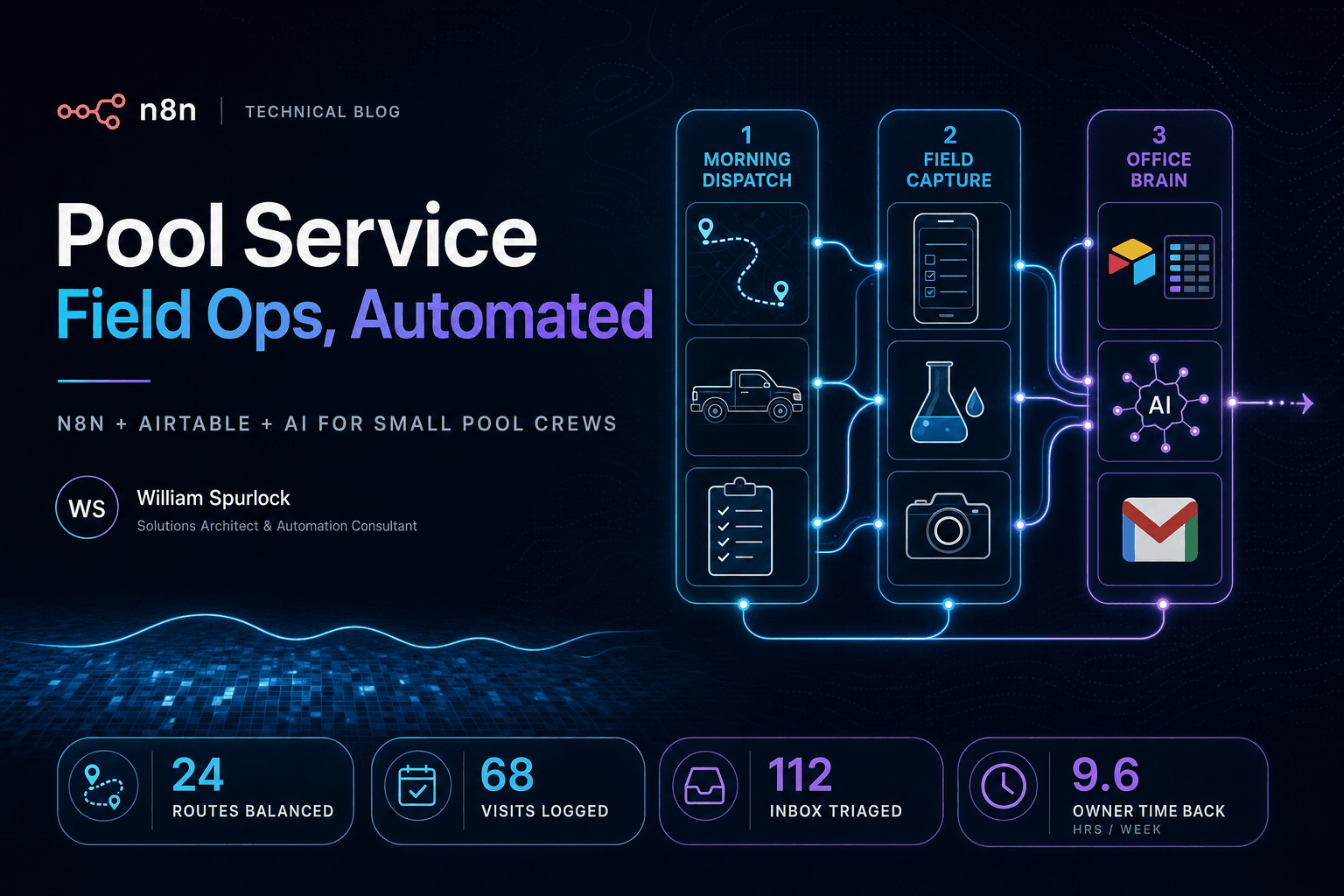
This piece is for owner-operators and lean teams: a few trucks, a dispatcher who is also answering the phone, and a pile of tools (QuickBooks, Gmail, maybe a whiteboard) that do not talk to each other. I am going to walk through a full automation layer I shipped for one pool-centric operator using n8n + Airtable + LLMs where they earn their keep: morning lists, structured field data, English-language access to your own records, and guarded email triage. The mechanics below come from that build; you can map them onto recurring routes (maintenance) or job phases and crew days (builders) with the same architecture.
Who This Is For (Be Honest) #
- Maintenance: You sell routes and chemistry, not one-off miracles. You need fair distribution, skill-aware assignment, and visit logs you can bill from.
- Builders: You sell projects—dig, steel, shoot, tile, startup. You need which crew hits which address on which day, clean handoffs between phases, and fewer “did anyone log the startup chemistry?” gaps after turnover.
If you are big enough to run ServiceTitan with a dedicated admin, you already bought your pain relief. If you are not, you still need one source of truth and automation that does not require a developer every Tuesday.
What “Full Stack” Ops Means for a Small Shop #
“Full stack” here is not one giant workflow. It is four patterns your business actually asks for:
| Question | Pattern | Typical trigger |
|---|---|---|
| Who works where today? | Scheduled assignment engine | Cron (before crews roll) |
| What did we document on site? | Ingest → interpret → persist | Webhook from forms, apps, or field tools |
| Can someone ask “where is this account?” in plain English? | Tool-backed chat | Slack, chat UI, or internal form |
| Which message actually needs the owner? | Classify → policy → escalate | Gmail or shared inbox |
n8n fits because small shops still need branching, retries, credentials, and a little JavaScript—without paying for an integration agency every time QuickBooks sneezes.
Crew & Route Lists: Rules First, Drama Never #
In the maintenance-style build I reference, two workflows drive daily assignment off the same Airtable model:
- Primary scheduled path — Every morning, pull today’s accounts and who is working, run assignment logic, then upsert into a
Daily Liststable so crews see one canonical sheet. - Timer-style variant — Same idea with the calendar shape that business actually runs (in this case, heavier load on specific weekdays—your shop might be Tue/Thu or “storm makeup Fridays”).
If you build pools instead of maintaining them, picture the same engine keyed on jobs instead of “weekly visit day”: excavation day, plumber call, electrician, startup blockouts—whatever fields you already track. The logic is still eligible people × eligible sites × fair distribution.
The interesting part is not drag-and-drop mapping. It is Code nodes:
- Skill tiers — Tough accounts or tricky equipment do not land on brand-new techs. Builders: swap “equipment tier” for phase complexity (e.g., first startup vs. acid wash assist) if that matches how you staff.
- Geographic grouping — Accounts carry a group; techs are filtered to group + day before round-robin.
- Workload balance — Nobody gets every “hour away” stop while someone else gets a tight cluster every week.
Your ops lead can see this in n8n; your developer (or vendor) can diff the JavaScript when you change the rules next season.
A third workflow exposes createList as an on-demand tool—same writes to Daily Lists, different entry (rerun after a sick call, ad hoc list for a float crew). Small shops live off reruns. Scheduled automation is not enough when a van goes in the shop at 6:12 a.m.
Site Records: From Messy Notes to Rows You Can Trust #
Maintenance: readings, chems, “customer says pump is loud,” algaecide added—if it stays on paper, you cannot price the next visit or defend a callback.
Builders: pre-plaster checklist, startup readings, warranty handoff photos—same problem, different noun.
The record-keeper pattern I wired looks like this:
- Webhook accepts a payload (visit or job identifier, readings, raw notes).
- LLM turns messy technician language into a consistent summary (original text stays attached for audit).
- Derived fields — e.g. Langelier Saturation Index (LSI) from chemistry inputs so anyone scanning the row sees balance risk without opening a textbook.
- Upsert to Airtable — one row per visit or service event, linked to customer/job and tech/crew lead.
That is not “fire your techs and hire ChatGPT.” It is give the office searchable truth so you stop playing telephone between the truck and QuickBooks.
Ops Chat: Your Office Manager Should Not Be the Only Human Interface #
Small shops get crushed by “quick questions”:
- “Did we service 14 Oak last week?”
- “Who is assigned to the Smith startup?”
- “Text me a map link—I am already driving.”
A dedicated ops chat workflow ties conversational input to narrow tools against the same Airtable base—search, update, create, map links for addresses. The model never gets raw SQL; it gets buttons you designed in n8n. That is how you avoid “the bot deleted my customer” horror stories.
Email: The Inbox Is Still Where Small Businesses Bleed Hours #
Gmail automation in this stack:
- Trigger on new mail.
- Classifier (this build: spam-ish / customer / money).
- Trash path: approval before delete—always, for a small business.
- Customer path: draft replies with tools when the thread needs lookups.
- Money path: Slack ping so invoices, draws, and lien-adjacent mail do not sit under newsletters.
Same pattern if you are a builder juggling subs, permit comments, and homeowner “can we move coping one inch?” threads. Intent detection + policy beats staring at a unified inbox at 9 p.m.
How the Pieces Share One Brain #
flowchart LR
  subgraph sources[Sources]
    S[Schedule]
    W[Webhooks]
    G[Gmail]
    C[Chat]
  end
  subgraph n8n[n8n]
    R[List / crew engines]
    K[Site record pipeline]
    E[Email triage]
    B[Ops chat tools]
  end
  subgraph data[Data plane]
    A[(Airtable base)]
  end
  S --> R
  R --> A
  W --> K
  K --> A
  G --> E
  C --> B
  B --> A
Airtable = what your team argues about in the same language (customers, jobs, crews, lists). n8n = what runs at 6:00 a.m. whether you slept or not. LLMs = language and intent—not your routing math.
Failure Modes That Hurt Small Shops First #
- Silent empty runs — If the employee query returns zero rows and the workflow still “succeeds,” you send crews out blind. Alert loud (Slack/SMS) when critical pulls are empty.
- Duplicate lists — Upsert on a stable key (customer + date + route key, or job + date + crew), not blind inserts.
- Email deletes without a human — Never. Not for a five-person company.
- Garbage webhooks — Validate shape at the door; park bad payloads somewhere you can replay after you fix the field app.
Code Nodes vs. AI Nodes (The Bill-Control Line) #
- Code nodes: routing, round-robin, tiers, geography—anything you can test with last week’s real CSV export.
- AI nodes: summaries, classification, chat retrieval—anything that starts as messy human text.
Mix them wrong and you get surprise API bills and surprise crew assignments. Small businesses feel both faster than enterprises do.
FAQ #
We only have three techs and one office person. Is this overkill? #
No—if you are already losing margin to rework and “who had this account?” You are not buying “enterprise automation.” You are buying the minimum structure so the owner can step off the phone long enough to bid the next job.
Maintenance vs. builder data model—do we need two systems? #
Usually one base with different record types (route accounts vs. active jobs), or linked tables for jobs under a long-term maintenance customer. n8n does not care; your upsert keys must match how you actually sell.
Do we have to use Airtable? #
No. Anything with an API (Supabase, Postgres + a simple UI, a vertical SaaS with webhooks) works. Airtable wins for small pool shops because your office can fix bad data the same afternoon without a ticket queue.
Where does AI pay for itself first? #
Inbox triage and note-to-row cleanup—both eat owner hours before you ever touch “fancy” agents. Scheduling stays deterministic unless you are doing serious drive-time optimization (and even then, keep the solver out of the LLM).
How do we not lose workflows when someone quits? #
Export n8n JSON to Git on every meaningful change. Name workflows like products: “Daily Lists – Main Route,” not “Will’s workflow copy 7.”
Closing #
Small pool maintenance and local builders share one problem: the business is “field-first,” but the systems are still “spreadsheet-last-week.” The companies that grow without imploding are the ones whose daily lists, site records, and inbox stay aligned—whether you are routing salt cells or steel.
If you are a small shop wondering whether n8n + a real database + a little AI can replace duct-taped Zaps and Sunday-night admin, it usually can—as long as you encode rules in code and reserve models for language.
I build these stacks for teams that cannot afford the wrong automation. Book an AI automation strategy call, tell me maintenance or builder and how many trucks you run, and we will see if your roughest constraint is ready to become a workflow.
Related Posts
The Hybrid Studio Stack: Running an AI + Web Design Practice Solo
How I run a solo hybrid practice combining AI automation systems and premium web design — the complete tool stack, workflows, pricing models, and time allocation that makes it sustainable.
How a 4-Person Ops Team Replaced 60 Hours of Weekly Work with One n8n + MCP Pipeline
A real-world case study of how a 4-person SaaS operations team eliminated 60 hours of manual weekly work through a single n8n pipeline integrated with MCP servers and Claude as the decision engine.
The Solo AI Consultant's Tech Stack: What I Actually Pay For in 2026
The complete $594/month tech stack that delivers infinite scale for solo AI consultants. Google AI Ultra, self-hosted n8n, multi-model access without subscription bloat, and why I don't pay for Claude, ChatGPT, or Vercel.